TL;DR: I used Telex (Automattic’s AI block builder) to prototype a race countdown concept in minutes, then refined it with Claude into a production-ready WordPress block with AI handling the heavy lifting. The whole thing took one afternoon and it’s now free and open source on GitHub.
If you’re an endurance athlete running WordPress, this was built for you.
I’ve been chasing a simple idea for months: a clean, minimal countdown card on my website that shows my upcoming triathlon and trail running events with a live timer ticking down to race day, and then automatically flips to show my finish results once the event is over.
That’s it. That’s the whole feature request.
And yet, every countdown plugin I found was either packed with 47 features I didn’t need, styled like a late-2000s sidebar widget, or locked the one thing I actually wanted behind a premium upgrade.
This is the part of WordPress that drives me crazy — getting gatekept from a basic piece of functionality because someone decided that showing split times or adding a race photo requires a $79/year subscription.
No thanks!
I’m a bootstrapper. I run a solo agency, I pay for my own tools, and I have zero patience for plugin bloat. My entire build philosophy with GeneratePress and GenerateBlocks is rooted in minimalism:
- load only what you need
- style it yourself
- keep the stack lean.
So the idea of installing a 2MB countdown plugin with jQuery dependencies and a settings page with 14 tabs was never going to fly.
I decided to build a WordPress block with AI.
Telex: The Spark
When I attended WordCamp Canada 2025, I caught a demo of Telex — an experimental AI-powered block builder from the Automattic AI team. The live demo wasn’t fully cooperating that day (it is experimental, after all), but the concept lodged itself in my brain and wouldn’t leave.
For those who haven’t tried it yet, Telex is a browser-based tool where you describe a WordPress block in plain language — what it should do, how it should look, what settings it needs — and the AI generates a fully working block plugin that you can preview in WordPress Playground and download as a ZIP. No local dev environment, no scaffolding, no webpack config. Just a prompt and a working plugin.
The WordPress community has been doing interesting things with it.
Jeffrey Paul, 10up’s Director of Open Source and a member of the newly formed WordPress Core AI team, built a Pong game block with Telex and got it into the WordPress plugin directory.
Automattic’s own design team has been experimenting with interactive blocks — text scramblers, minesweeper, scroll-triggered animations, puzzle games — all built through conversation with the tool. Matt Mullenweg has been vocal about Telex fitting into his broader vision for Gutenberg as a builder that anyone can use, regardless of coding ability.
I finally had a real use case to test it with, so I opened Telex and described what I wanted:
a block that lets me pick a race date, add a title, select an event type (Sprint, Olympic, Half-Course, Ultra), toggle Swim/Bike/Run disciplines with configurable distances, and display a live countdown timer that ticks down to race day.Telex generated the entire plugin scaffold in seconds. Block registration, editor sidebar controls, countdown logic, styles — all of it. Working code, downloadable as a ZIP, ready to install.
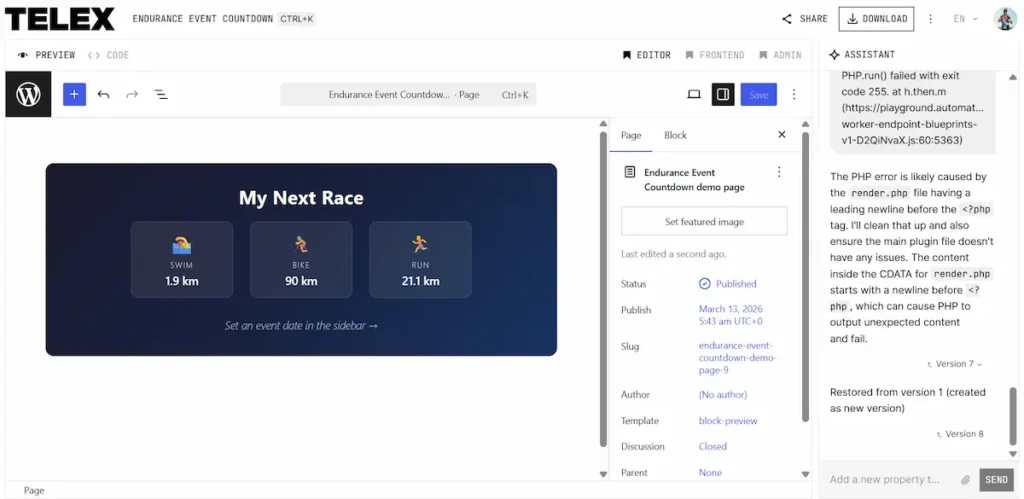
You can see the original Telex project by clicking here!
Now, I should be honest about the experience. Telex is still very much experimental. It crashed on me a couple of times, and some of the generated code needed adjustments before it would behave properly in the editor. This isn’t a criticism — the tool literally tells you it’s an experiment, and the Automattic team has been transparent about that. But it’s worth noting if you’re thinking about trying it yourself.
Go in with the right expectations: it’s a concept validator and rapid prototyper, not a production-ready code generator. At least not yet.
What Telex gave me was something more valuable than perfect code. It gave me a working prototype that proved the idea was feasible, and a codebase I could take into the next phase.
Claude: The Refinement
I took the Telex-generated concept and spent the next hour working with Claude to rebuild it into exactly what I needed. Not approximately what I needed — exactly.
The Automattic Special Projects team actually recommends this workflow in their own guide to Telex: use Telex for rapid prototyping, then take the code to a coding AI like Claude to finish the job properly when you need production-quality architecture.
Here’s what the finished plugin does:
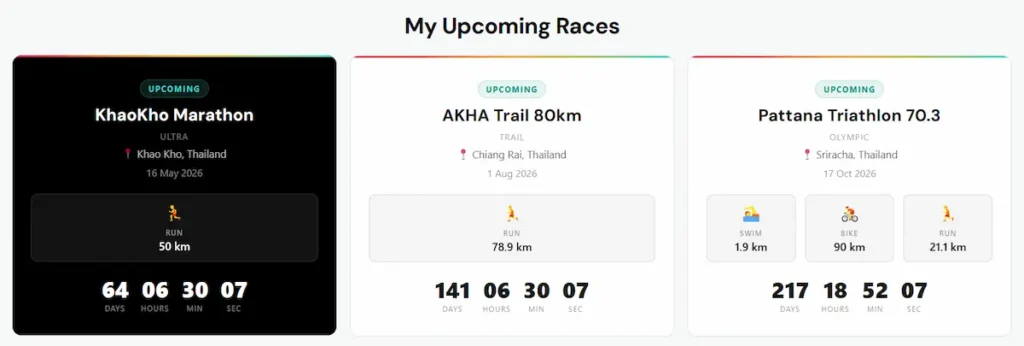
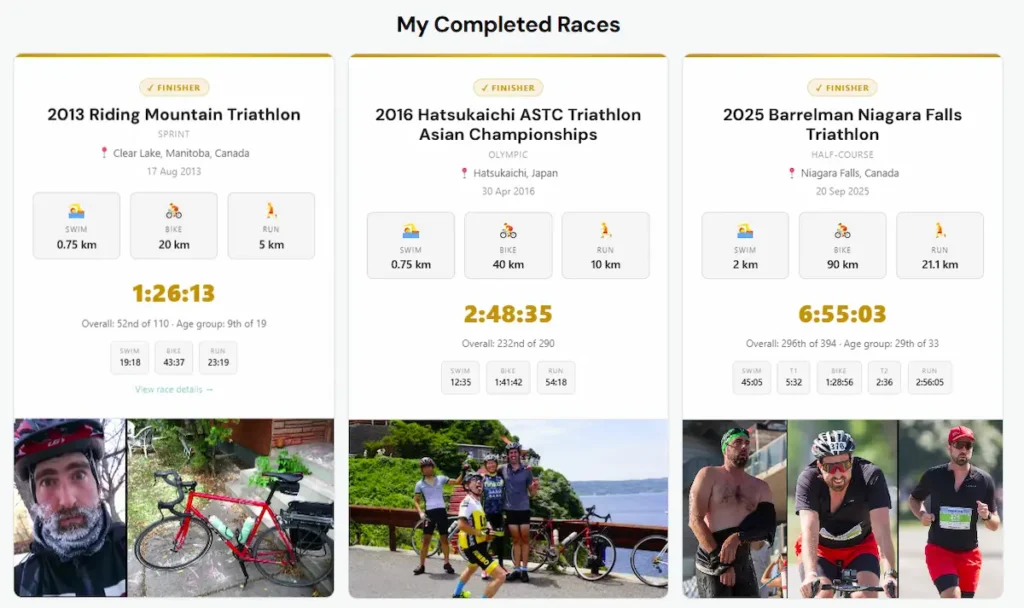
- Three automatic card states. Upcoming races show a live countdown timer that ticks every second on the frontend. Once the race date passes, the card automatically switches to “Awaiting results…” with no intervention needed. When I come back and add my finish data, it flips to finisher mode with a gold accent bar and all my race details.
- Full results tracking. Total finish time displayed in gold, overall rank, age group rank, and split times broken down into compact badges — Swim, T1, Bike, T2, Run. Everything I track in my race performance spreadsheet, now visible on my website.
- Race photos. I can pull a finish line photo directly from my WordPress Media Library and it renders below the results. The photo goes after the data, not before — I wanted the stats to be the hero, with the photo as the payoff at the bottom of the card.
- Clickable cards. Every card can link to a race recap blog post or an external event page. The entire card becomes clickable with a subtle hover lift effect.
- Dark and light themes. One-click toggle between a black card (which is what my site uses) and a white card with subtle borders. Switchable from the block toolbar or the sidebar.
- Disciplines always side by side. Whether the card shows one discipline or three, the swim/bike/run pills never wrap to a second line. They flex to share the available space equally.
- Inherits theme typography. The block uses
font-family: inheritinstead of hardcoding a font stack, so it automatically picks up whatever your theme loads. On my site that’s DM Sans via GeneratePress. On yours it’ll be whatever you’re running.
- No build step. No webpack, no node, no npm install. Four files — a PHP file, an editor JS file, a frontend JS file, and a CSS file. Upload and activate. That’s it.
The whole thing was built in a single sitting. From Telex concept to published plugin on my live site, including the GitHub repo setup, the README documentation, and screenshots — one afternoon.
Screenshots of my Endurance Race Block Plugin
Why I Open-Sourced It
I could have kept this as a personal tool. It was built for my site, for my race calendar, for my specific needs. Nobody asked me to share it.
But that’s kind of the point of WordPress, isn’t it?
I’ve been building on open-source software for my entire career. GeneratePress is open source. WordPress itself is open source. The tools I depend on every day exist because someone decided to share their work instead of locking it behind a paywall. The least I can do is contribute something back, even if it’s small and niche.
The plugin is called Endurance Race Block. It’s free, it’s GPL-licensed, and it’s on GitHub right now. If you’re a triathlete, trail runner, ultramarathon runner, or any kind of endurance athlete with a WordPress site, it was built for you.
You can see it live on my site with my full race history — from my first sprint triathlon in Manitoba back in 2013, through Hatsukaichi in Japan, Barrelman 70.3 in Niagara Falls, and my most recent events here in Thailand: Sri Lanna Triathlon and the Mae Kampong Mini-Cross Country.
What This Means for Builders Like Me
I want to step back for a second and talk about what’s actually happening here, because I think it’s bigger than one niche plugin.
I’m not a developer. I’m a web designer and copywriter who has learned enough PHP and JavaScript over the years to be dangerous, but I’ve never built a WordPress block plugin from scratch before. The block API has always felt like a wall — JSX, React, webpack configs, build pipelines. That’s developer territory, and I’ve never had the time or motivation to cross into it.
With AI, that wall is gone.
Not lowered — gone.
Now I just describe what I want in plain language, get a working prototype in minutes, refined it through conversation over the course of an hour, and publish a production-ready block plugin before my coffee gets cold.
It’s on GitHub, it’s installable, it works, and it does exactly one thing well.
Try It Yourself
GitHub: github.com/jefvandegraaf/endurance-race-countdown-plugin
Telex project (original prototype): telex.automattic.ai/projects/14474113
See it live: jefvandegraaf.com/endurance-sports/
How to install: Download the ZIP from GitHub, upload it to your WordPress site via Plugins → Add New → Upload Plugin, activate it, and search for “Endurance Race Block” in the editor. Everything is controlled from the sidebar — no code editing required.
Hey! If you build something cool with it, or if you have feature requests, open an issue on GitHub or drop a comment below…
Thanks for reading!